A digital QR code menu for your restaurant, café or bar
Build the digital menu here, print one QR code for the table, and change the prices whenever you like. Guests scan it with the phone camera and read it on their own screen - no app, no download, nothing to install.
On every guest's phoneScanned at the table, or opened from a link sent in a chat before they set off - the menu is a page in their own browser, on any phone.
Change it at any timeA new price, a new dish, a dish sold out: it is on the menu the moment you save. The printed code never changes, so nothing is reprinted.
Eco-friendlyNo stack of menus reprinted for every new price, and none thrown away when the season changes. One code on the table does the job of all of them.
Scan a code or tap a card - each opens a real published menu, exactly as a guest at the table gets it.
A QR code menu in three steps
1
Build the menu
Tabs for food and drinks, a line for every dish with its price, photos and allergens - or bring it all in from a spreadsheet.
2
Publish it
Pick a look, add your logo, and the menu goes live at an address of its own.
3
Print the code
Put it on the tables. When a price changes, save - the printed code already opens the new menu.
Everything on one menu
What your guests get at the table, and what saves you time behind the bar.
For your guests
Allergens and diets
The 14 EU allergens as numbered pictograms on every dish. Guests filter out what they cannot eat - or everything that is not vegan, gluten-free or nut-free.
In their language
Type the menu again in English, Bosnian or German and a guest switches with one tap. Every word is yours - nothing is machine-translated.
Your own photographs
Put a picture on any dish, offer or event. Crop it in the browser as you upload it - every one is squared and shrunk so the menu still opens quickly on a phone.
Search the whole menu
On a long menu, a search box finds a dish in any tab while it is being typed.
Open now?
Your hours for the week, "Open now" while you are, and the days you are closed for a holiday.
Wi-Fi and the way here
The network and its password, copied with one tap, and your address with a link to the map.
Offers and events
Tabs of their own for a happy hour and for what is on this week. A lapsed offer and a finished concert leave the page by themselves.
Prices in their currency
A guest can switch the menu into a currency they think in, at the rate you set, shown as approximate.
Their own list
Guests note what they fancy and see the total before they order. It is a note for the table, kept on their phone; only how often a dish is picked is counted, never by whom.
For you
Edited in minutes
Tabs for food and drinks, headings inside them, and a line for every dish with its description and price.
Sold out, from your phone
Service mode is one switch per dish on your phone: mark the special sold out mid-service, or put a notice at the top of the menu.
Every price at once
Raise or lower a whole menu, tab or heading by a percentage or an amount, and see every new price before anything is saved.
From your spreadsheet
Have the menu in Excel already? Bring the dishes in from a CSV file, every row checked before anything is added.
No limit on scans
Every table, every night, for as long as you like.
It looks like your place
21 ready-made looks, your logo at the top, and every colour yours to change.
See who opens your menu and what they pick
Your menu keeps count for you: how often it is opened, and what guests put on their list. So what stays, what moves up and what comes off is decided with the figures in front of you.
How often the menu is opened
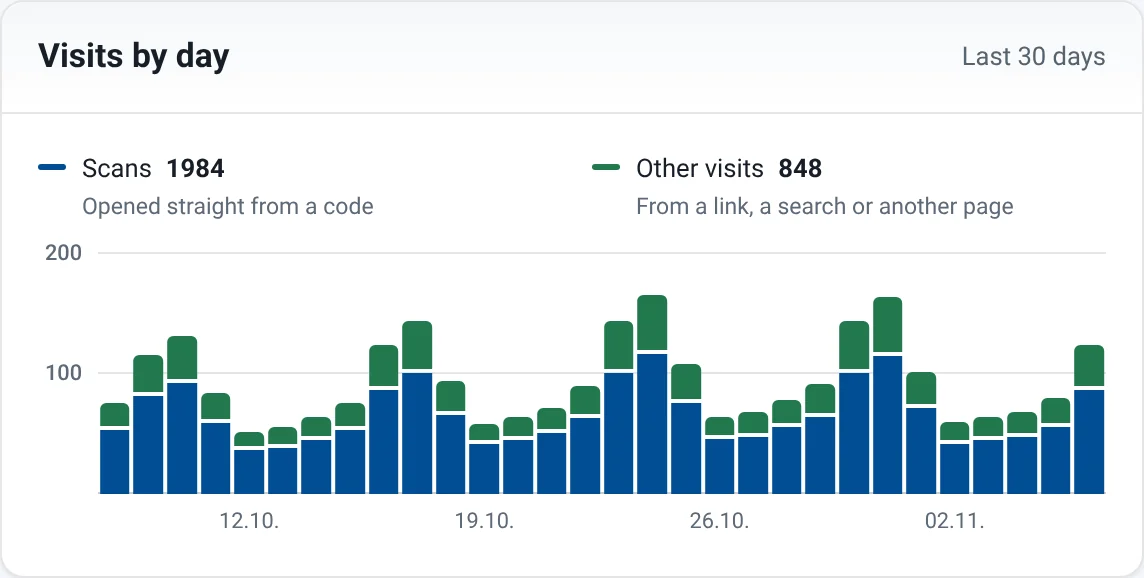
Visits by day Every opening of the menu, a bar a day for the last 30 days, so a quiet Monday shows against a busy weekend.
Scans and other visits How many guests came from a QR code, and how many followed a link from somewhere else.
Scans per place Give the terrace or table 12 its own code, and see how often each one is scanned.
Example figures on a demo menu.
What guests pick
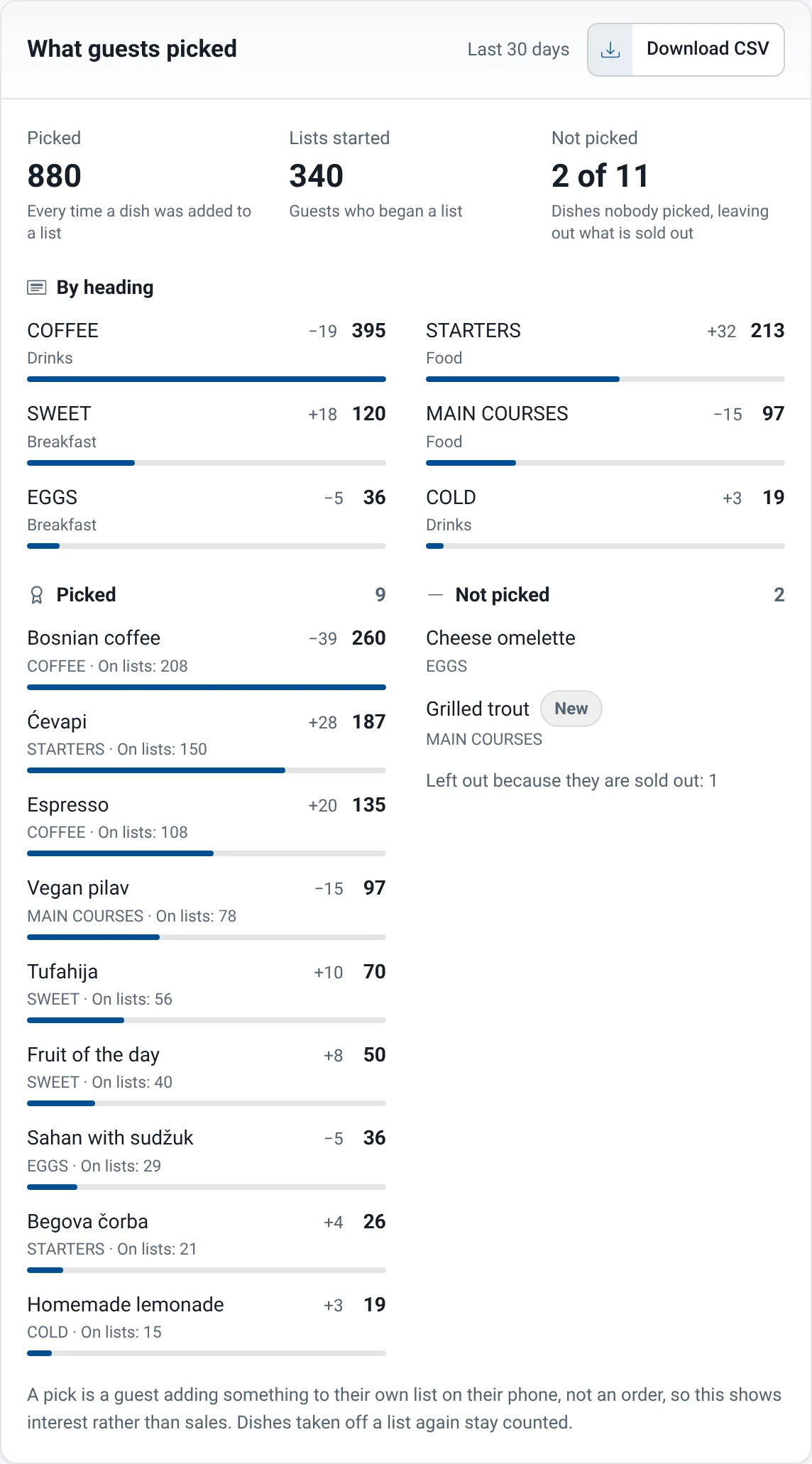
Everything picked Every dish and drink guests added to their list, most picked first, how many lists each is on, and how it moved against the period before.
Not picked Every dish nobody picked, so you know what needs a better photo, a better place or a rethink. New dishes are marked, because they have not had their chance yet.
Popular headings How picks divide across your headings: starters against mains, coffee against cocktails.
Lists started How many guests began a list at all, next to how often the menu was opened.
Yours to keep Download every dish and its figures as a spreadsheet.
A pick is a guest adding something to their own list, not an order, so it shows interest rather than sales. Only the counts are kept, never who picked what.
Menu statistics are included from Business. On a plan below that, nothing is counted.
Example figures on a demo menu.
A QR code that belongs to the menu
Every menu comes with its own code, ready to print. There is nothing to design: it takes the menu's colours, and you decide what goes with it.
In the menu's colours
Change the menu's look and the code follows it, with the contrast kept high enough for any phone to read.
It says what it opens
A caption under the code tells guests it is the menu, in the menu's own language. Leave it off for a code that goes into a design of your own.
Your logo in the middle
The logo at the top of the menu can go in the middle of the code too, and the code is made sturdier to carry it.
PNG, SVG and PDF
PNG for a screen or a document, SVG for the printer, and a PDF at exactly the width you type.
A code for each place
Name the terrace, the window or table 12, and each gets a code of its own. Every one of them opens the same menu, and menu statistics show which is scanned most.
Printed at the right size
Say how far away people will stand and you are told how big to print it - and stickers and posters come ready to print from the menu.
Side by side
Why choose Digital Menu Studio?
Your menu here, set beside the three ways a menu usually reaches the table. Where one of them does as well, the table says so.
Digital Menu Studio compared with a printed menu, a PDF behind a QR code and a menu page on your own website
Digital Menu Studio
Printed menu
PDF behind a QR code
A page on your website
Changing a price
Digital Menu StudioYes: Live the moment you save
Printed menuNo: Every copy reprinted
PDF behind a QR codePartly: Edit the file, upload it again
A page on your websitePartly: When whoever runs the site has time
A dish sold out tonight
Digital Menu StudioYes: One switch, on your phone
Printed menuNo: The waiter has to say so
PDF behind a QR codeNo: Not without a new file
A page on your websitePartly: If someone edits the page in time
Reading it on a phone
Digital Menu StudioYes: Made for the screen, tab by tab
Printed menuNo: Paper only
PDF behind a QR codePartly: Pinching and zooming an A4 page
A page on your websitePartly: Depends on the site
Allergens and diets
Digital Menu StudioYes: 14 pictograms and a filter
Printed menuPartly: Footnotes, if there is room
PDF behind a QR codePartly: Footnotes to read through
A page on your websitePartly: A list at best, no filter
Other languages
Digital Menu StudioYes: Switched with one tap
Printed menuPartly: A second set of menus
PDF behind a QR codePartly: A file per language
A page on your websitePartly: If the site has them
Paper-free
Digital Menu StudioYes: One code on the table
Printed menuNo: Reprinted with every change
PDF behind a QR codeYes: No paper either
A page on your websiteYes: No paper either
How often it is opened
Digital Menu StudioYes: Visits and scans, by day, with menu statistics
Printed menuNo: No way to tell
PDF behind a QR codePartly: Only with extra tools
A page on your websitePartly: With analytics set up
Your account is debited in convertible marks (BAM/KM). Any euro figure shown is the same price restated at the fixed rate of 1 EUR = 1.95583 BAM, for information only.
Card payments are processed by Raiffeisen BANK dd Bosna i Hercegovina.
Online card payment through Raiffeisen e-pay is currently being set up. Until it goes live, paid plans are paid by bank transfer.
Questions people ask
How do I make a QR code menu for my restaurant?
Build the menu here - tabs for food and drinks, a line for every dish with its price - and publish it. It comes with its own QR code to print for the tables; prices change the moment you save, and the printed code never has to be reprinted.
Is the digital menu free?
Building a menu and previewing it costs nothing and needs no card. Publishing it for guests, with its code for the tables, starts on Personal.
Can I change prices after the code is printed?
Yes, as often as you like. The code holds the menu's address, not the menu, so a new price, a dish that has run out or a new season's card is on every table the moment you save - and the code you printed stays where it is.
What happens to the printed codes if my plan ends?
The menu stops being published, but nothing is deleted: the code holds the menu's address, and the address is kept. Order a plan again and the same code opens the menu again - nothing has to be reprinted.
Do my guests need an app to open the menu?
No. They point the phone's camera at the code and the menu opens in the browser they already have. Nothing to install, no account, and it reads on an old phone with the data turned down.
Can I put the code in my own table cards and posters?
Yes. Download it as SVG, which stays sharp at any size, or as a PDF at the exact width your layout needs - and the code's page tells you how big to print it for the distance it will be scanned from.
Build your menu now, for free
Building and previewing cost nothing and need no card. A plan publishes the menu when you are ready.
We use only the cookies the site needs: one to sign you in, one for security, one to remember the language you picked, and one to remember this answer. There is no advertising and no third-party analytics or tracking. Your choice is kept for this browser session only.
How your data is handled
What we hold
Your name and email address, the menus you create, and the record of what you have paid. Nothing is collected that you have not typed in or uploaded yourself.
Why
To provide the service you signed up for — keeping your menus and publishing them. That is the contract between us; we do not process your data for anything else.
Cookies
Four: a session cookie that signs you in, a security token that blocks cross-site request forgery, a language cookie written only when you switch language, and one that remembers your answer to the cookie notice. A published menu sets none of them.
What a scan records
On a plan with menu statistics, a published menu counts how often it is opened, how many of those openings came from a code, and how often each dish is picked for a guest's list, so the owner can tell whether the code is being used and what guests choose. Those counts are the whole of it. On any other plan none of this is counted.
Who else sees it
Nobody, beyond the three processors below and our own QR Code Studio once you open it from here. Your data is not sold, shared or sent to advertisers. A menu you publish is public because publishing it is the point; nothing else about your account is.
How long
For as long as your account exists. Payment records are kept because tax rules require it. Close your account and we delete the rest.
Your rights
Under the GDPR you can ask for a copy of your data, correct it, have it deleted, take it elsewhere, or object to how it is handled. Ask and we act within one month.


 Café Lucia
 Klub Vertigo